Showing posts with label Lotus. Show all posts

Tuesday, December 4, 2007

IBM Is At It Again! (or Get Your Sametime Hotfixes!)

So last month I wrote about the release of hotfixes for Quickr 8.0.0.2 (or FP1) on the day after the fixpack was released. At that time I stated:
"First of all, I can see no possible way that enough customers called in within a day and IBM was able to reproduce, compile, and generate a Hotfix posted to Fix Central within the span of a day."
Today I see that there are Fixes to known stability issues with Sametime 8.0 server. And how long have these stability issues been seen in production environments for Sametime 8.0? Precisely 5 business days. The technote was published sometime yesterday and Sametime 8.0 was released just 4 days earlier. I also know that customers couldn't even download the files from Passport Advantage for most of the day Thursday (the release date).

My question is similar to the one I asked about the Quickr hotfix conundrum:
"I'm going to take it a step further and ask why IBM would release a known-buggy fixpack followed immediately with a hotfix? This should really not happen - take a little more time and get it all bundled correctly."
But now I'm not just asking the question about a fixpack, but about the gold release of a "dot-zero" world-class IM server.

Don't get me wrong, I'm excited that IBM is proactively releasing hotfixes. But I'm not thrilled that a product is released into production and then just days later there are fixes for "known stability issues"...

By the way, Carl Tyler has also posted about this. He simply states that "It always amazes me how IBM can release a product, and then one or two days later issue fixes for it. Surely these fixes were known about 1-2 days ago?"

Friday, November 2, 2007

Slowtus Notes

We've all heard the pithy ways Notes has been described. Slowtus Notes, Lotus Bloats, etc....

Here's a good technote from IBM on how to address poor performance when inside of Lotus Notes. It could be your computer, server, or (dare I say it?) the developers... :)

Knowledge Collection/Troubleshooting Guide: Known causes of slow database performance

Tuesday, October 30, 2007

Welcome Aboard

I've been meaning to do this for a while...

Welcome to the Lotus 911 team David DeWell!!! I've been working with him some the past couple of weeks and am excited about the experience he is bringing onboard.

Friday, September 28, 2007

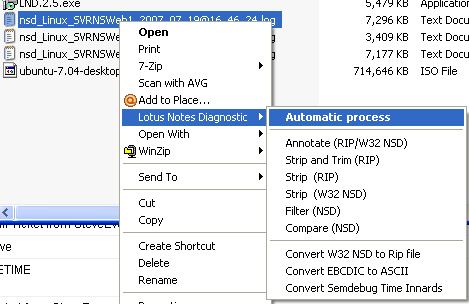
Lotus Notes Diagnostic Tool - Windows Explorer Integration

Yesterday, I randomly stumbled upon this:


If you have an NSD on your drive, you can right-click it and see a "Lotus Notes Diagnostic" menu!! If you select "Automatic process", the nsd will be processed and the LND application will open in Lotus Notes. Furthermore, the nsd will be removed from your drive and added to the application. (Update: Actually, after further working with this, the NSDs are not removed from the drive but a new folder is created in the same directory where the NSD resided. The folder corresponds to the date that the NSD was analyzed and is in DD_MM_YY format.) There are some other options for RIP (old school) and NSD files. And for you System i shops, you'll love the "Convert EBCDIC to ASCII".

This tool gets cooler and cooler! Now to wait on some crashes... :)

Monday, September 24, 2007

"Lotus Notes Diagnostic Tool" Has Been Released

Hat tip to Jack Dausman for this info! As Jack said, this is for Admins what NotesPeek is for developers! The download can be found in The Sandbox. Once you download it, you'll want to run the setup program and then sign the local notes database. I'm hoping that (more of) this code will be extended to the Fault Analysis code that's on Domino 7+ servers as it already does some of this.

From Jack's blog:
If you are programmer, you might remember the excitement when NotesPeek and NotesPing were first released. Well, LND is the definitive administration tool for Domino failure analysis and will be quite worthwhile to study.

It has some cool features, like recreating the server doc from a DXL dump, NSD file comparisons, and reading through all the semaphore locks.

It does come with a help document , but there isn't much hand holding--you are going to need to know the terms and architecture of Domino to really extract value from LND.

After a quick test drive, I agree. It does a good job of gathering all of the relevant information and presenting it in a friendlier format than the NSD. Kudos to IBM for releasing this. It won't tell you "Hey, here is exactly why you had this crash", but it will get you pretty close...

Monday, August 20, 2007

The Shiny New Notes Client - Back To The Future!!!

The opening paragraph from the upgrade Redbook (Page 21) states it all:
The Notes ... client interface has been completely redesigned. This interface looks and acts more like a browser, and integrates the regular Notes client function with access to the Web better than it did before. Many of the things you used to do in the Release ... client are now only one mouse-click away.
Oh I'm sorry, I was reading from the wrong Redbook. That was the Notes/Domino R4 To R5 Upgrade book from March 2000. Let's see what the ND8 team came up with at the Interface page (as I've also seen written elsewhere):
It’s here! IBM® Lotus Notes® and IBM Lotus® Domino® 8 software showcases a modern, Web-like look-and-feel in a familiar Lotus Notes client format. Updated to help you work smarter, the new user interface presents the tools you need, when and where you need them. It’s visually appealing, highly consistent and feature rich. That means you get your job done faster, and easier. And, you enjoy it along the way. Who says work can’t be fun, too?
Sorry...I had to.

Notes and Domino 8 are so far beyond R5, but both releases were significant in their own right. Hopefully I got a laugh out of some of you! Congrats to IBM on ND8!

Saturday, August 18, 2007

A Response To Volker's Latest Issue With Notes

I have posted this as a comment at Volker's post * on IBM Technote 1267071: Changes in Lotus Spreadsheets document do not save

Regarding the issue Volker raises here, I believe I have found the problem and there is a VERY simple workaround and this issue is probably unlikely to be seen in most real world uses.

If you create a new spreadsheet or open an existing one, go to a cell and type something. If you click into another cell or hit tab or enter and then click the "x" to close the spreadsheet, then you will always receive the prompt to save the spreadsheet. If you just type something in a single cell but don't navigate to another cell, then you will not receive the prompt to save the modification. A bug indeed, but the IBM Technote should be updated. I will also be notifying Lotus via a response to the technote with how to reproduce this and also to hopefully modify the technote with a note to tab out of the field to receive the prompt for saving the modifications.

* It's ironic that I'm responding to someone who is "neither a business partner, a design partner nor a customer" of the Lotus products, but this is how Volker describes his involvement with Lotus products. I felt that since so many people will see the issue he raised that I would also let you know how to easily avoid the issue that was pointed out by someone who claims to not be a user of the product.

Friday, August 17, 2007

Getting Lotus Connections 1.0.0 To Work With Domino LDAP

If you haven't seen already, Mitch Cohen has documented an infrastructure with Lotus Connections talking to Domino LDAP for authentication. Check it out!

Wednesday, August 15, 2007

Notes 8.0 NOMAD

According to IBM Technote 1265230, "Notes on a Stick" will be supported for the Basic configuration in 8.0. They hope to allow the Standard version to run from a stick in a later release (threads in the Public Beta forum mention 8.0.1). I can't imagine that Standard would run too well from a USB drive, though.

But, I guess we'll find out in a couple of days if Basic runs well on a stick.

Wednesday, August 8, 2007

Quickr and Sametime Presence Awareness Issue Resolved

Nathan and I wracked our brains over this issue! We could get presence awareness going for about 30 seconds and then it would go away. Well today we got past that in the strangest fashion...

The basic setup was a Windows Server 2003 box running MS Virtual Server with a Quickr VM and a Sametime (7.5.1 CF1) VM. Nothing earth shattering. We decided to re-allocate that server for an installation of Lotus Connections, so I shutdown the VMs and moved them to another server (same OS). It was actually the same hardware specs but with less RAM (Connections needs the RAM!)

After bringing up the Quickr and Sametime VMs on the other server, presence awareness was working like a champ! Never saw that one coming!

Thursday, July 26, 2007

Curiosity Killed The Cat

But not Curious Mitch. In my thread asking for new bloggers, Mitch Cohen pointed me to his blog (mostly related to Quickr and Sametime). It's been a good read and he's fairly active. And since I've been working with Quickr lately, it's very timely.

Also, don't miss Bob Baehr's blog. He already has a countdown to Lotusphere 2008 - 177 days from now if you're wondering. We're now closer to LS08 than to LS07!

Can't Delete Person from NAB? (SnTT)

So, after upgrading a server from 5.0.2b to 7.0.2FP2 this week (the clients were 4.6.7!), I did a lot of cleanup and added the LocalDomainAdmins group. I know for a fact that at one point I renamed in ACLs the old admin groups as well. I was also able yesterday to delete a good many old accounts.

Well today we were unable to delete accounts. So I did the usual ACL checks on the NAB and even explicitly added my account. Everything was cool, but I got an error that I wasn't authorized to perform the operation (clicking the "Delete Person" button).

No errors in log. Nothing on the console. Nothing in DDM. Nothing but an error. So I go into Full Access Administration. Nothing. So then I decided to check Admin4.nsf ACL. Sure enough, LocalDomainAdmins was NOT in there! I know it was because I was looking through catalog.nsf verifying things yesterday.

But, I was then able to delete an account. And I also added LocalDomainAdmins to every db....

Now Playing: "Insanity" by Firewind

Technorati:

Friday, July 20, 2007

Linux NSD Tip

Generally with the Linux NSD files you will find the "Input arguments" line with the -crashpid and -crashtid. For example:

Input arguments : -batch -crashpid 4459 -crashtid 134 -wrapper

Of course you can find out which process is running by searching for just the pid number compared to the processes listed in the Notes Process Summary section:

notes R .. 3347 3337 -bash -c /Domino/lotus/bin/server
notes R ... 3568 3347 /Domino/lotus/notes/latest/linux/server
...
notes R .... 4459 3568 /Domino/lotus/notes/latest/linux/http


So we've already determined that the http task was the crashing process. But here's another handy search:

crashpid:crashtid

Just put in the crashpid# then a colon followed by the crashtid# (Note that if the tid# is 3 digits that there should be 1 space between the colon and the tid. If the tid is 2 digits there would be two spaces - basically it's expecting up to 4 digits for the tid# with the leading digits being spaces instead of zeroes). This should help out in finding a db that may have caused it.

In this instance we would search the NSD for: 4459: 134

When that string is found, then you know that you're looking at the actual crash thread for the crashing process. For instance, you may see the following section:

/Domino/notesdata/Path/DB.nsf
Version = 43.0
SizeLimit = 0, WarningThreshold = 0
ReplicaID = 0x85256e42:0x034ece60
bContQueue = NSFPool [ 0006dc45]
Offline = No
DeleteInProgress = No
FDGHandle = 0xf024057a, RefCnt = 9, Dirty = Y
SemContQueue ( RWSEM:#0:0x029d) rdcnt=-1, refcnt=0 Writer=[ : 0], n=0, wcnt=-1, Users=-1, Owner=[ : 0]
By: [ http:4459: 90] DBH= 311, User=Imperial
...
By: [ http:4459: 134] DBH= 371, User=CN=User Name/O=Org

So, with this tip, you are able to determine that something in the Path/DB.nsf application was the cause of the server crash.

Technorati:

Wednesday, July 18, 2007

Where Are The New Bloggers?

I've been thinking and it's been a while since I've seen some new faces in the Lotus Blogging community...

With that being said, I would like to welcome two new bloggers.

The first is Michael Smelser. He's a colleague of mine here at Lotus 911 and makes the 5th Blogger here!! It looks like Mike may be focusing on dev - looking forward to it.

Also, let me introduce you to Bryan Kuhn. He's a former colleague of mine and he's been updating his blog a little more lately. Bryan focuses on BES and Dev (though not at the same time) at his blog.

Also, Ed Brill (and others) linked to two new sites in the past week - LotusViralMarketing.com and FastNSF.com, so check em out if you haven't already.

Anyone else out there have a new blog and just starting up? Would love to hear from you!

Thursday, July 12, 2007

Notes Client Debugging Parameters

I like to dump this section of parameters into my Notes Client notes.ini file. It's all commented out and you can just remove the semi-colons as needed to enable more or additional logging. If you can think of any other options let me know, but this is a good base.

;-------------------------------------------
;-------------------------------------------
;-----Notes Client Debugging Parameters-----
;Console_LogLevel=2
;LOG_SESSIONS=1
;LOG_CONNECTIONS=1
;DEBUG_TCP_ALL=1
;CLIENT_CLOCK=1
;CONSOLE_LOG_ENABLED=1
;DEBUG_CONSOLE=1
;-------------------------------------------
;-------------------------------------------

p.s. - I'm doing this as much for my record in case I need to debug a remote client I can just hit my blog for this reference... :)

Wednesday, June 20, 2007

Great NOMAD Tip

Judging from my Google hits, I seem to be the Nomad expert. Googling Lotus Notes Nomad yields my review as the #2 site after IBM. So I thought I would follow up with a way I've been using it now as a consultant.

First of all, Nomad is intended to provide USB stick access to the Notes client and it's great. However, you can also install multiple instances of Nomad on larger drives, shares, or local drives. You can check out the full installation procedure from the link to my review above, but below is a modified version that will allow you to have separate Nomad installs for multiple customers (or other needs). This keeps you from having multiple location documents and dealing with cross certificates, etc... It would require you to have about 400 MB free space for each install as well as a bare-bones installation that you would need to use later. Below is a modified installation process.

1. Insert the USB drive into the USB port on your computer and create a "NOMAD\base" folder. This can also be performed somewhere on your local disk. (i.e. C:\NOMAD\base)
2. Make note of the drive letter that is assigned to the USB drive.
3. Extract the C94QIEN.exe file. This is the filename of the self-extracting executable downloaded from IBM. This is just the Notes Client. (The C94QAEN.exe is the Full Client package with Admin and Designer - you can alternatively extract this file.)
4. In a command prompt window, navigate to the folder where you extracted the C94QIEN file (there should now be a setup.exe), and then enter this command to install Lotus Notes on the USB drive:
setup /a /v"NOMAD=1 TARGETDIR=F:\NOMAD\base\ /qb+"
Where F is the drive letter.
The parameters /qb+ allow for the display of the basic user interface and a message box at the end of the upgrade. Don't forget the last quotation mark!
5. Perform the post-install cleanup (from my original review) to free up space.
6. The \base folder now has a copy of the Nomad installation. You can run Notes from here, but I use it to keep a copy of the files.
7. Create a folder \NOMAD\CustomerX.
8. Copy and paste the entire contents of the \NOMAD\Base folder into the \NOMAD\CustomerX folder. This step can be repeated for each customer!!
9. Open the \NOMAD\CustomerX folder and edit the autorun.ini file. You will need to modify the path for the MSI_LOCATION= and MSI_COMMANDLINE= (including the DATADIR= part of this line) options. You will see that they may have F:\NOMAD\Base\... Simply modify this to be the CustomerX path. Save and close the autorun.ini file.
10. The \NOMAD\CustomerX\autorun.inf and \NOMAD\CustomerX\Program Files\Lotus\Notes\notes.ini files will also need to be modified to match the path.
11. Run the command AUTORUN.EXE from the root of any of the CustomerX folders by double-clicking on the filename or by typing the command on the command line. OR
12. Alternatively, create a shortcut to the nlnotes.exe and just run this.

This can provide a good deal of flexibility and gives you a clean Notes install for each customer!

Thursday, May 17, 2007

My Big News!

As I've hinted at, I have some huge, exciting news to share!!

Beginning on May 29 I will start my new job with Lotus 911 as a Lotus Consultant!!! Thanks for the warm welcome Nathan!

This is a wonderful opportunity for my family and me. It will be a major shift for me moving from a position as an Admin/Developer for 7 years with a private sector company to a Consultant position. I am really looking forward to the challenge of that change as well as working with some great talent and wonderful folks!

My family will be in a transitional phase for a while as we will be moving from Rock Hill, SC to Kennesaw, GA. In honor of this and through peer pressure, my wife, Jen, has also started a blog! As a bit of background, I have always had the nickname "Nut" because of my last name. With that said, my wife's blog is "The Nut House" and as she posted in her first post, "watch out Bulldogs - family of nuts and Gamecock fans headed your way!"

Tuesday, May 8, 2007

Updated Sandbox Application

One of the first applications I downloaded from the Sandbox was the "Staff Whereabouts". It's basically an in-out board to see the status of a workgroup. We actually got the application to replace an AS/400 based! signout application. I have commented at the sandbox that I have reworked the ui and have web-enabled the application. I actually web-enabled it a while back. We only have one or two people that may use it on the web, so not much time was invested in it (it's mostly if you need to signout in a pinch). But about a month ago I completed changed the colors of the ui. It could stand for a complete overhaul, so forgive me if it still looks like a Notes application. :)

Here's what it looks like now:


If anyone's interested, post a comment. I don't want to link directly from here since it's not really my application.

Wednesday, May 2, 2007

My Donation To The Lotus Museum

I "donated" the picture of Notes "Express", Release 3.30 for OS/2. Thankfully, I don't have to manage any more OS/2 boxes!

Tuesday, May 1, 2007

Lotus Museum

If you're in the mood to check out some of the history of Lotus, check out the new Lotus Museum. I've already made a donation and am waiting for it to show up online. I'm relatively new to Lotus, so this is a great site for me to brush up on some history.

I'm digging the Nurf Football and the Sametime Coaster is pretty nice! But the Captain's Hat is maybe the sweetest item!

So little time...